giovedì 29 novembre 2012
lunedì 26 novembre 2012
venerdì 23 novembre 2012
giovedì 22 novembre 2012
Windows RT: cioè la Microsoft fa gli stessi errori di Apple
Oltre che per intrattenimento, qui un maneggevole tablet Windows RT sarebbe stato un ottimo strumento per studiare... se solo avesse avuto un certo tool in più (uno solo) che attualmente è disponibile solo per Windows.
Ho chiesto al technical support dell'azienda che produce quel diffusissimo tool se avessero in programma una versione per Windows RT. Ecco cosa mi hanno risposto.
Gentile cliente,
non abbiamo in programma il porting del nostro software su Windows RT poiché Windows RT contraddice tutti i motivi per cui noi creiamo software per Windows anziché -per esempio- per Apple.
Non solo dovremmo riscrivere da zero l'intero software utilizzando una tecnologia completamente diversa (il che già richiede molti anni-uomo di lavoro) ma dovremmo addirittura accettare di farci ingabbiare in compromessi tecnici e commerciali che... sono esattamente quelli inventati da Apple.
Potrebbe anche darsi che in futuro non ci resti altra scelta, ma per il momento in tutta sincerità speriamo che Windows RT fallisca miseramente in modo che Microsoft riveda drasticamente le sue politiche commerciali.
Se infatti Windows finisce per avere tutti gli svantaggi delle piattaforme Apple, allora non c'è più motivo per usare Windows.
Distinti saluti,
... ...
... ... Technical Support
E poi si lamentano che la gente passa a LINUX !
lunedì 19 novembre 2012
domenica 18 novembre 2012
sabato 17 novembre 2012
venerdì 16 novembre 2012
giovedì 15 novembre 2012
sabato 10 novembre 2012
Sgarrupati
Quei balconi non mi convincono molto.
Sono "in sicurezza"?
Sono "a norma di legge"?
In particolare, osserviamo i balconi più in alto: sono stati "murati" e perfino "finestrati"...
Queste cose si vedono solo a Napoli.
venerdì 9 novembre 2012
Il bello delle manifestazioni...
...Il bello delle manifestazioni è che ti bloccano gli autobus e la circolazione per un'ora, fanno una caciara bestiale, e alla fine i passanti nemmeno capiscono contro chi si manifestava.
mercoledì 7 novembre 2012
mercoledì 24 ottobre 2012
Menuet OS power in my hands!!
Five minutes trying Menuet OS 0.98.84 64-bit (released yesterday) in VirtualBox 4.1.12 under Ubuntu 12.04:
- duh, it just works...!
- entire distribution fits in a single diskette image (1.44Mb; you can easily build the CD image... 1.5Mb: yes, 1.5 megabytes)
- pre-emptive multitasking with 1 KHz scheduler, multithreading, SMP up to 8 cpus, hard real-time data fetch support, etc: oops, while in Virtualbox this means it sucks all available CPU power; I guess it is due to 1000Hz scheduling (host machine was set with a 70% cap, resulting in more than 50-60% cpu usage while running a few demos)
- responsive GUI working on VESA standards, using transparencies and skinnable windows and drag'n'drop; mouse did not require particular Virtualbox configuration. It was a bit eerie navigating windows with that two non-aliased fixed-size fixed-width fonts. Has a starting "Menuet" menu in the bottom-left side of the screen; the always visible bottom area contains running program names. A weird thing was the need to click the "Menuet" button to wipe out the opened menus/submenus.
- editor and assembler for applications (yes, you will write apps using assembly language; the operating system itself is written in x86 assembler, both 32 and 64-bit; the assembler of choice is FASM);
- USB support for a few peripherals (including USB 2.0 storage, webcam, printer, TV/radio, and USB 1.1 keyboard and mouse); USB boot supported (I did not yet test it)
- TCP/IP stack with utilities (HTTP browser and server, FTP client and server, etc; sadly, it seems to lack a PING utility); networking addresses can be configured in the first phase of the boot (oops: only fixed IP addresses, no DHCP seen yet)
- system configuration at boot time in a commented text-file full of hex numbers (nerdy style)
More news coming soon...!
domenica 21 ottobre 2012
Nokia N900: broken USB, fixing charging
I had to abandon my first Nokia N900 because of broken USB port. The microUSB receptacle of the N900 is directly soldered on its mainboard (yes, the most stressed part of the phone without any safety: brain-damaged engineering is not an Apple exclusive).
When it broke, I bought a second N900, saving the first one for backup purposes. And after one year of careful usage, on a Friday late evening it suffered the same fate, meaning that:
I won't ever buy Nokia products again.
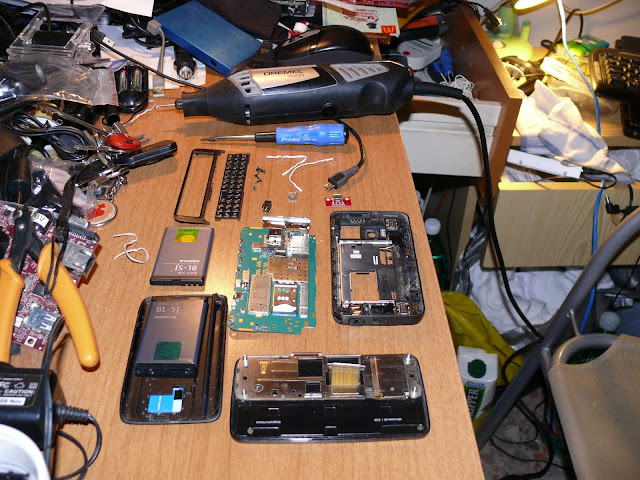
MicroUSB port is required both for data connection and for battery-charging. Without the microUSB port, you need to power off the phone, take out the battery and charge it on some external charger, which is quite annoying.
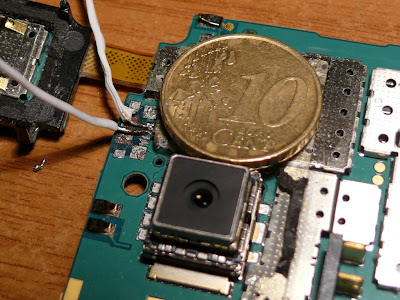
After a bit of googling I decided to put a header in place of the microUSB-receptacle but it was even harder than imagined. The five "pins" of the receptacle are some tiny 0.5mm-spaced drops. I eventually was able to solder D+ and D- cables (photo below), which are needed to use "tethering", that is: charging the phone while you use it as a modem. But -sigh!- a few minutes later I crashed them without hope to restore (they were not meant to resolder). This means I have to forget about tethering.
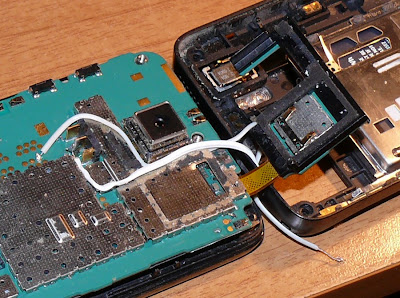
Then I decided to short them; shorting D+ and D- (or, at least, 220 Ohm resistance) is required by the N900 to accept any 5V source to charge the battery. Fortunately, GND and +5V are replicated on the "test pads"; GND is also the center pin of the battery connector.
Applying +5V to the 5V/GND pads will regularly charge the BL-5J battery because D+ and D- are always shorted.
Opening the N900 was quite easy: four small screws for the screen and two small Torx for the keyboard and keyboard cover. More on that on talk.maemo.org forum.
I am now able to charge the N900 without having to power off / extract battery. After a bit of dremeling, I steadily placed the ugly 4-pin female header (chosen because "safe for my pockets); it does not perfectly fit, and my N900 does not "close" well, but at least I don't have to switch to another phone (moving calendars, addressbook, music, videos, etc and learning apps, configurations and so on).
I also switched screen and keyboard (both a bit scratched) with the ones from my first N900, so that my current unit feels somewhat rejuvenated...
When it broke, I bought a second N900, saving the first one for backup purposes. And after one year of careful usage, on a Friday late evening it suffered the same fate, meaning that:
I won't ever buy Nokia products again.
![]() |
| Sala operatoria: pronti per l'intervento sul Nokia N900 |
After a bit of googling I decided to put a header in place of the microUSB-receptacle but it was even harder than imagined. The five "pins" of the receptacle are some tiny 0.5mm-spaced drops. I eventually was able to solder D+ and D- cables (photo below), which are needed to use "tethering", that is: charging the phone while you use it as a modem. But -sigh!- a few minutes later I crashed them without hope to restore (they were not meant to resolder). This means I have to forget about tethering.
![]() |
| La monetina da 0,10€ serve per far capire quanto erano "grandi" e "vicine" le saldature da fare |
Applying +5V to the 5V/GND pads will regularly charge the BL-5J battery because D+ and D- are always shorted.
Opening the N900 was quite easy: four small screws for the screen and two small Torx for the keyboard and keyboard cover. More on that on talk.maemo.org forum.
![]() |
| Recuperati 5V e GND e "shortati" D+ e D- |
I also switched screen and keyboard (both a bit scratched) with the ones from my first N900, so that my current unit feels somewhat rejuvenated...
![]() |
| L'orrendo header femmina serve a non far pasticci quando l'N900 è in tasca |
Categoria
N900
Iscriviti a:
Post (Atom)